


This is a fun tutorial to show how to use Pixlr Express, a free online photo editor. It can give your photos a fresh, unique look. I use it to create collages.
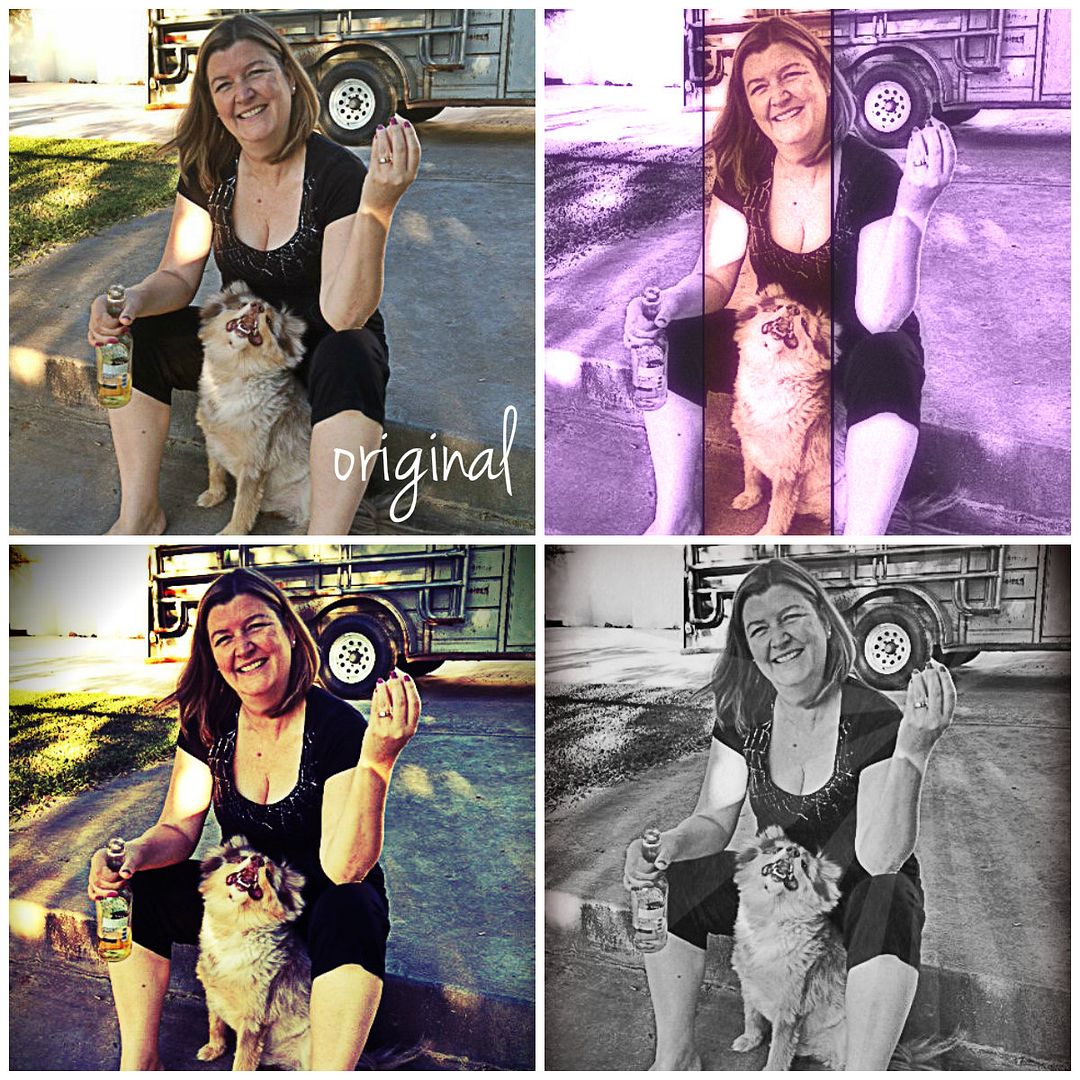
The steps are easy.
1. Visit Pixlr Express and “click” Collage. Choose Layout, upload your photos and begin editing.

2. To apply different effects to each photo, click on the paintbrush at the top of each photo. Apply effects, then save to return to the collage.

3. To apply the same effect to all of the photos, choose finished. Then apply effects.

Edit options include Adjustment, Effect, Overlay, Border, Sticker, and Text. Select each one to see your choices. With Adjustment, you can rotate, crop, lighten, etc. Effects contain the filters. Overlays are bursts of images.

When finished, save to your computer.

My edits in the top collage were as follows:
Top Left = Jenna Sue Text
Top Right = Hagrid Effect
Bottom Left = Satya, Gram, Helena and Hans Effects
Bottom Right = Tom and Ingrid Effects, bronze and Roger Overlays

Here’s one my daughter made! Now I’m holding a pop-tart while a monkey plays on the lawn. Super sweet!
Pixlr Express is also available to download for FREE to your iPad or iPhone.
Give it a try, and share your results!




Comment By: Ron
October 16th, 2013 at 8:13 am
Jean, outstanding tutorial! You’ve explained everything so clear!
Brava!
I use PicMonkey right now for my online photo editing, but am always open to try something new.
So thank you. I will give Pixlr a try!
Have a super day!
Comment By: Jean
October 16th, 2013 at 8:49 am
Thank you, Ron!
Let me know how you like it. I noticed PicMonkey wanted a lil’ $ from me.
You have a great day too!
Comment By: Ron
October 17th, 2013 at 9:10 am
Jean, just wanted to stop back and let you know that I played around with Pixlr last night and LOVED it! There are many things I can do there that I can’t do over at PicMonkey, so I think that will be my new photo editing hangout.
And you’re right, PM charges to use certain photo editing effects.
Thanks again for letting us know about Pixlr!
Comment By: Jean
October 17th, 2013 at 9:44 am
Ron, thank you! I was thinking my post was a big FAIL. I’m so glad you tried it and liked it! If you visit just pixlr dot com (without the express), you can use an editing program that is very similar to photoshop – again free.
Comment By: Krysten
October 16th, 2013 at 8:47 am
I usually use PicMonkey for my picture editing needs but I’ll have to check this out and see how it compares.
Comment By: Jean
October 16th, 2013 at 8:50 am
Thanks, Krysten. I’ll try PicMonkey too. 🙂
Comment By: Luisa Doraz
October 16th, 2013 at 5:51 pm
I like. Maybe one day I will try this out. Thanks.
Comment By: Jean
October 17th, 2013 at 9:46 am
You’re welcome, Luisa.
Comment By: Joyce
October 16th, 2013 at 7:01 pm
I have something like that on my computer. It’s fun to mess with photos.
Comment By: Jean
October 17th, 2013 at 9:45 am
Hi Joyce – I enjoy messing with photos. The majority of my photos are enhanced in some way. Thanks for stopping by! I hope your bruise is healing.
Comment By: Jayda
October 17th, 2013 at 12:49 pm
Fun! I’m going to have to try this! I love your daughter’s edit…makes me wish I was eating a pop-tart 🙂
Comment By: Jean
October 17th, 2013 at 2:42 pm
Mmmmm.. pop-tarts! Now I’m craving one! LOL!
Comment By: Single Mom in the South
October 19th, 2013 at 4:59 am
I’ve been using picmonkey of late.
Comment By: Jean
October 19th, 2013 at 7:36 am
Hi Single Mom! I tried a simple project on picmonkey, but they wanted money for some of their features. Give Pixlr a chance if you ever tire of paying.
Comment By: kathy @ vodka and soda
October 20th, 2013 at 4:59 am
i’ve been using pixlr for years! who needs to dish out $600 for photoshop when you have this??
Comment By: Jean
October 20th, 2013 at 8:10 am
Exactly, Kathy! Thanks for stopping by. You have gained a new loyal reader aka stalker. 🙂
Comment By: elle sees
October 21st, 2013 at 4:13 am
i have that on my phone. love it!
Comment By: Jean
October 21st, 2013 at 8:39 pm
Yes! It is good to know pixlr is used & enjoyed! Thanks, Elle.
Comment By: Rach
October 23rd, 2013 at 11:08 am
I love Pixlr! I have Photoshop now, but I still occasionally use Pixlr. 🙂
Comment By: Jean
October 27th, 2013 at 10:16 am
I was surprised how many photoshop-like options Pixlr has too! Photoshop is a wonderful program! We use it in our ad designs.
Comment By: Denise
October 24th, 2013 at 5:33 pm
My friend just told me about your blog and also “Cooking With Mr. C. on Facebook. (also a blog) I just “Liked” his page and came to see your site. I appreciate when people share blogs with each other. Denise
Comment By: Jean
October 27th, 2013 at 10:15 am
Hi Denise, and welcome! I checked out Cooking with Mr. C too now that you’ve told me about it. Hope to see you around again. Leave your website address and I’ll be sure to visit you as well.