

You’re losing readers. Inadvertently, but none the less, there they go. You asked them to check out your friend’s blog.
“Click the link!”
So they did. I did.
I’m all for a good pimp. Believe me, my pimp hand is strong.
Your friend is great! I comment, check out their profile, and follow them on twitter. Your friend (my new friend) is pimping their friend’s website. I follow the bouncing link, and feast my eyes on a beautiful portfolio. Click on one? Why sure! Now I’m all wrapped up in an apron aficionado’s blog, drooling over apple recipes. Yes, this really did happen.
So now my break is over, and I’m closing windows. What should I see at the back of the group? Your page!
After meandering all over the internet, I forgot to leave you a comment!
How can you prevent me from wandering off and not finding my way back? Four little words: target equals underscore blank.
Inserting a little bit of html behind your links will open a new window instead of directing people away from your sight.
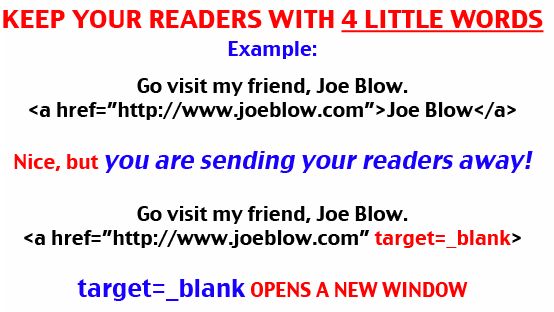
This holds true with buttons, links to Twitter, FaceBook, and blogging groups. Edit their code. It’s easy!
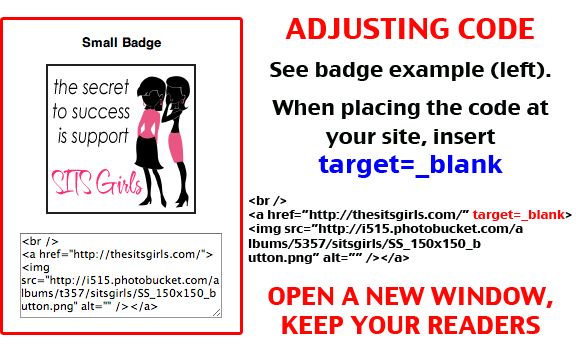
• Do you use these four magical words?
• Do you ever wander so far off the beaten path, you forget where you started?




Comment By: Sue McGoo
November 6th, 2010 at 8:47 am
This is the best advice I’ve seen in forever. -In fact, I stopped reading certain people specifically because their links to outside sources send me on this kind of chase.
Comment By: Jean
November 6th, 2010 at 9:05 am
Thank you, Sue! It drives me crazy too. I’ve gotten use to pressing command to force a new window or tab to open, but thought this post could be of service.
I miss your blogs.
Comment By: Adriane
November 6th, 2010 at 8:56 am
YES! I do! I love that little code, and use it when I link in my blog…mainly because it irritates me when other people don’t.
Comment By: Jean
November 6th, 2010 at 9:11 am
::: high five ::: I’m glad you do use that code, Adriane! It makes life so much easier. Thank you!
Comment By: Stacy
November 6th, 2010 at 9:08 am
Thanks for posting this Jean! My web host is set up so they just ask if I want links to open in a new window (I don’t have to use HTML any more), but I always wondered how to do it. Now I know for other sites and pages. 🙂
Comment By: Jean
November 6th, 2010 at 9:12 am
You’re so welcome, Stacy! I hope it is useful code in your future. I’m planning to post a tutorial on html mapping soon, which also might be of use. Enjoy your weekend!
Comment By: Marian
November 6th, 2010 at 9:27 am
Thanks Jean!
Comment By: Jean
November 6th, 2010 at 9:30 am
You’re so welcome, Marian!
Happy Weekend to you!
Comment By: Angelia Sims Hardy
November 6th, 2010 at 9:59 am
You are so right! Drives me crazy when it’s the same window and I Iose where I was. I am a mad clicker. I think it’s ADD to pretty shiny buttons and badges.
My links open new windows and I usually double check them too.
Great advice! I hope everyone reads this. 🙂
Angelia Sims Hardy recently posted..Live- Love- Laugh – Our First Dance
Comment By: Jean
November 6th, 2010 at 11:34 am
Thanks, Angela. I think the ones who haven’t commented are madly fixing their html this morning. LOL!
Jean recently posted..4 Little Words Keep Readers From Straying
Comment By: Diane
November 6th, 2010 at 10:08 am
Wow – Thanks Jean. Yes, I wander all over the place once someone sends me somewhere else. Great piece of advice!
Diane recently posted..Dear Ozzy-
Comment By: Jean
November 6th, 2010 at 11:36 am
Thanks, Diane. I wander too, and really enjoy finding new treasure! I just want to be able to thank the lead blog friend when I’m done.
Great post at your blog this morning. Not sure if my comment posted.
Jean recently posted..4 Little Words Keep Readers From Straying
Comment By: Sunny Wishes She Were Shopping
November 6th, 2010 at 10:13 am
Thank you! This is a great new thing to learn and I can’t wait to put it to use!
Comment By: Jean
November 6th, 2010 at 11:36 am
You’re welcome, Sunny. I”ll bet you could post a tutorial blindfolded!
Jean recently posted..4 Little Words Keep Readers From Straying
Comment By: Beth
November 6th, 2010 at 10:46 am
Thanks for this–you are a wealth of information, Jean! ♥
Get distracted? Me?
Oh, look! A chicken!!
Comment By: Jean
November 6th, 2010 at 11:37 am
Chicken? Where!?! LOL!
Thanks, Beth!
Jean recently posted..4 Little Words Keep Readers From Straying
Comment By: Chaplain Donna
November 7th, 2010 at 8:19 am
Great advice Jean! I always try to do this when I have a choice, but now I have the code! I appreciate the wisdom.
Comment By: Jean
November 7th, 2010 at 11:21 am
You’re very welcome, Chaplain Donna. It’s a pleasure to be of help. 🙂 Happy Sunday!
Jean recently posted..4 Little Words Keep Readers From Straying
Comment By: starla
November 7th, 2010 at 9:59 am
Thank You Jean for the html trick. Now I can have a method to my maddness. I appreciate you helpful advice.
Comment By: starla
November 7th, 2010 at 10:00 am
shoot madness has only one D sigh.
Comment By: Jean
November 7th, 2010 at 11:21 am
You’re welcome, Starla. Don’t worry about the typo. I wrote a note to my daughter’s teacher this a.m., and think I have 2 errors on it. LOL! I need spellcheck.
Jean recently posted..4 Little Words Keep Readers From Straying
Comment By: Jeannette
November 7th, 2010 at 2:47 pm
Best advice ever! Thank you so much! I am going to go add these to all my links and delete my little message to “right click to open a new window”.
Thanks so much for stopping by my blog earlier. It is so nice to meet you. I’m your newest follower.
Jeannette recently posted..Wholl Be the Biggest Loser
Comment By: Jean
November 7th, 2010 at 2:56 pm
Oh Cool! Thank you, Jeannette. It’s a pleasure to be of help.
Following you @ Twitter now. 😀
Comment By: Sherri
November 7th, 2010 at 6:11 pm
Oh hell to the no! I didn’t know that. That’s awesome info Jean. I’m going to try it now. I have those SITS badges on my page. My blogroll links I have the option of making open up in a new window. I need to go through and make them all like that though. Thanks again for keeping me in the loop. Although, I would think by now if somone doesn’t know how to right click and open up a new window, you might not be as internet savy as you thought (not you Jean, I mean anyone who doesn’t know how to right click so the link won’t take you away from the page you’re on!)
Sherri recently posted..Halloween 2010
Comment By: Jean
November 7th, 2010 at 6:23 pm
Sherri, you are so funny!
Good luck. You can do this!
You’re welcome.
Thanks for the right click info. I’m on a MAC, which is command + enter for a new window, but I didn’t know about the PC way. See, you rule!
Jean recently posted..4 Little Words Keep Readers From Straying
Comment By: mommakiss
November 7th, 2010 at 7:29 pm
Codes, clicks, html…I don’t even know where I am!
:p love this advice.
Comment By: Jean
November 8th, 2010 at 6:27 am
Once in a while, the geek in me breaks out. 😀
Comment By: mindy@thesuburbanlife
November 8th, 2010 at 8:46 am
Love it! And so appropriate…I just recently discovered that “other” option when linking my own posts. People were leaving my current page to go to my old page and then not coming back to my current page. It was a dirty endless cycle. Thank you for trying to spread the word on how to end this madness. 🙂
P.S. Thanks for stopping by my blog and commenting!!
Mindy
http://www.thesuburbanlife.com
mindy@thesuburbanlife recently posted..Halloween 2010
Comment By: Jean
November 8th, 2010 at 9:24 am
Thank you, Mindy! I’m glad you did discover this. Opening a new window is so appreciated! It’s the least I can do to help spread the word.
You are welcome for the visit. Your blog is so adorable! Your photos so darling!
Comment By: Helena
November 8th, 2010 at 12:14 pm
This is so incredibly useful. I could kiss you right now.
Comment By: Jean
November 8th, 2010 at 12:43 pm
Ok, but no tongue!
Comment By: Helena
November 8th, 2010 at 4:25 pm
Oops. Sorry about that. Next time, I promise not to lick your face.
Helena recently posted..THAT was a busy week
Comment By: Sedate Me
November 15th, 2010 at 10:20 am
Just make sure you gals take a picture (and post it here) next time that happens.
Comment By: Tweets that mention 4 Little Words Keep Readers From Straying | jeanhasbeenshopping.com -- Topsy.com
November 8th, 2010 at 12:52 pm
[…] This post was mentioned on Twitter by Helena and Helena, Jean Gallant. Jean Gallant said: there's an elephant in the room. http://wp.me/p122CP-Oj […]
Comment By: stacey@Havoc&Mayhem
November 8th, 2010 at 4:35 pm
I always open links in a new tab with my mouse roller so it never occurred to me other people were not getting new windows. I’ll have to check my links.
Comment By: Jean
November 8th, 2010 at 7:43 pm
Hi Stacey ~ I try to remember to open a new page, but can’t always say that I do. I hope you find this tutorial useful.
Jean recently posted..4 Little Words Keep Readers From Straying
Comment By: Mama Mary
November 9th, 2010 at 10:58 am
OMG, I think some of my links send people away. EGADS! The ones that I added on my own send people away b/c I didn’t know about this. THANK YOU!!! : ) I’m off to see if I can figure it out. Otherwise, I’m emailing you.
Mama Mary recently posted..is it okay to say gay- when you’re not gay
Comment By: Mama Mary
November 9th, 2010 at 11:05 am
Hooray! I just changed the SITS badge on my site. And then just discovered a tab with the link function with my creating a post that asks me if I want to open the link in a new window. Didn’t even know it was there, hello!!! Thanks girl. : )
Mama Mary recently posted..is it okay to say gay- when you’re not gay
Comment By: Jean
November 9th, 2010 at 3:25 pm
Mary, I’m proud of you! You did it, and discovered a new tool. A+++
Jean recently posted..4 Little Words Keep Readers From Straying
Comment By: Gary
November 9th, 2010 at 1:17 pm
Great advice Jean!!
Gary recently posted..Photo of the Day – 11-09-10
Comment By: Jean
November 9th, 2010 at 3:25 pm
Thanks, Gary. 🙂
Jean recently posted..4 Little Words Keep Readers From Straying
Comment By: Jason
November 9th, 2010 at 6:44 pm
Great post. i find it’s too easy just to publish what you want to share without realising the effect it has on your own work.
Thanks for sharing 🙂
Comment By: Jean
November 9th, 2010 at 7:06 pm
Good point, Jason. Doesn’t take much effort to add a bit of html to ensure your desired effect is obtained.
Hope you’ve been well. I’m SURE you’ve been busy! Thanks for swinging by.
Comment By: San Diego Momma
November 9th, 2010 at 7:15 pm
I thought I knew everything, EVERYTHING!
My mind is a steel trap! I am usually such a genius!
But. I. Did. Not,. Know. This.
In awe of your HTMLedness,
Deb
San Diego Momma recently posted..PROMPTuesday 129- Your First Crush
Comment By: Jean
November 9th, 2010 at 8:47 pm
Aw, tis nothing, San Diego Momma. Thank you! Wait’ll I really get techy! LOL.
So nice to meet you. I’ll be right over.
Jean recently posted..4 Little Words Keep Readers From Straying
Comment By: Charlotte
November 10th, 2010 at 7:41 am
Wow, I never actually thought about that but what a helpful piece of advice! And it’s definitely happened to me before.
Charlotte recently posted..Atlantic City Halloween recap finally
Comment By: Jean
November 10th, 2010 at 7:59 am
Thank you, Charlotte. I haven’t had enough coffee yet either, and know exactly what you mean. LOL!
Comment By: Charlotte
November 10th, 2010 at 7:42 am
And by “happened to me before” I mean getting sent on a wild goose chase. Forgive me. Way early and I haven’t had enough caffeine in my system just yet 🙂
Comment By: Blond Duck
November 10th, 2010 at 12:10 pm
Popped in from SITS to say hi!
Comment By: Jean
November 10th, 2010 at 12:17 pm
Hi Blond Duck. How are you doing today? I appreciate your visit.
Comment By: Souldose
November 11th, 2010 at 6:54 am
Just learned something I didn’t know, thank you
Comment By: Jean
November 11th, 2010 at 7:48 am
You’re welcome, Souldose. I hope you are doing well.
Comment By: Sle
November 11th, 2010 at 7:53 am
Right you are!
BTW: I’ve moved. New URL: http://istillfeelunusual.wordpress.com/
Comment By: Jean
November 12th, 2010 at 8:01 am
Thanks for your new link, Sle!
Comment By: Pop
November 11th, 2010 at 11:09 am
I learn something new every day. Thank you, Jean! Also, is your pimp hand strong for smacking too?
Pop recently posted..Friday Flip-Offs- 11-7 Pop’s Edition
Comment By: Jean
November 12th, 2010 at 8:01 am
Naw, pop, but sometimes I’m in a kicking mood!
Comment By: Pop
December 2nd, 2010 at 8:20 am
Hopefully not with pointy-toed shoes!
And I’m now using this in all my posts, so don’t you dare STRAY! 😛
Pop recently posted..The Cross and Noogies
Comment By: Arts web show
November 11th, 2010 at 6:32 pm
and thats the truth. lol
Arts web show recently posted..Arts web show ep 4- Just like the movies
Comment By: James
November 11th, 2010 at 8:56 pm
When did you become the wise old sage and start giving out these snip pits of wisdom? I hope this is not a new direction as I always came here for the good looking chics
Comment By: Jean
November 12th, 2010 at 8:00 am
Hi James! Great to see you!
Have no fear. Tutorials are few & far between.
Comment By: Helena
November 13th, 2010 at 2:43 pm
Still loving this!!! I’m going to retweet it again. More people need to know about this trick.
Comment By: Jean
November 13th, 2010 at 5:32 pm
Awww, thanks, Helena!
My girls are still enjoying Picnik. In fact (shhhh), I’m thinking of upgrading!
Comment By: Helena
November 21st, 2010 at 4:31 pm
It’s totally worth it. Promise.
Helena recently posted..All this awesomeness in one place That CANT be healthy
Comment By: Michelle Saunderson
November 13th, 2010 at 4:09 pm
Wow, I had no idea. Thank you so much for sharing this. I will have to implement this from now on.
Michelle Saunderson recently posted..Christmas is Fast Approaching- Gotta Get My Christmas Mojo
Comment By: Jean
November 13th, 2010 at 5:32 pm
You are so welcome, Michelle. It was such a pleasure to find your blog today.
Comment By: Tammy
November 14th, 2010 at 9:21 am
Thanks for the advice! If I insert a link or photo in my posts, I usually check the box to “open in a new window”. I hope I’m doing it right!
Tammy recently posted..Happy Halloween
Comment By: Jean
November 14th, 2010 at 9:41 am
You are doing it right!
Thanks for stopping by, Tammy.
Jean recently posted..4 Little Words Keep Readers From Straying
Comment By: Sedate Me
November 15th, 2010 at 2:13 pm
Do you use these four magical words?
No, but I use a lot of four letter words.
Actually, I may be a total tech-retard, but I was using this trick 4-5 years ago (back when I had a website). The last thing I want is to send readers away from my brilliant writing and I’m sure my readers felt the same way.
Do you ever wander so far off the beaten path, you forget where you started?
That reminds me of the time I almost appeared on an episode of Canada’s Worst Handyman. They were working on (aka destroying) a frat house a couple buildings down the street from my office. They were shooting the contestants walking down the street from a nearby bar. This bar was also featured in a Michael Moore movie, a movie that had an interview with one of my mom’s doctors.
Now -uh- where was I again? Right. I was about to describe the time I looked up and saw Weird Al walking past my window…no, the threesome I had in the park in broad daylight…no, the time I caught J-Roc rubbing one out in his mom’s crib. http://www.youtube.com/watch?v=bEsMjd9a8rY
No. That wasn’t it. Ah, fuck it.
Comment By: Jean
November 17th, 2010 at 7:02 am
Sedate Me – I would have LOVED to have read your blog!
Don’t know who J-Roc is, but he totally got busted. Hmmm… so which one are you? 🙂
Comment By: Sedate Me
December 7th, 2010 at 11:28 am
You wish you could have read my blog???
Be careful what you wish for, Jean. For 99% of people, reading my old website would probably be about as enjoyable as visiting Auschwitz in its final days of operation while on a bad LSD trip.
But a blog? Blogs are below me, my dear 😉 I didn’t blog. I wrote an on-line compendium of intensely researched and brilliantly written articles on a wide variety of important topics. The articles averaged about 15,000 words in length, which is probably why I only posted about 3 of them a year.
The profanity laden hatred, the threats of violence directed toward specific elected officials and the call for the complete destruction of the current Western way of life has probably earned me a reservation for a cell in a secret CIA torture prison right between Osama and the Wiki-leaks guy.
The good/bad news is that I’m seriously considering re-starting my website.
Comment By: Sedate Me
November 19th, 2010 at 2:14 pm
I’m the good looking, intelligent, one.
Actually, the clip is from possibly the most beloved Canadian TV in decades, The Trailer Park Boys. It was a zero-budget, largely improvised show that ran for 7 uncensored seasons on a basic cable channel. They’ve also done a few movies, nationally touring stage shows and are working on a new show The Drunk & On Drugs Happy Fun Time Hour.
The premise of the show was that a camera crew was following around a bunch of low-lives living in the Sunnyvale Trailer Park and documented their various escapades.
J-Roc is a secondary character. He’s Sunnyvale’s answer to Eminem and is the leader of the Roc-Pile. For much of the series, this “badass gangsta” lived in his mom’s trailer.
Here’s a random sampling of J-Roc at work. http://www.youtube.com/watch?v=N68t7NvuTgQ
In case you’re interested, every episode of The Trailer Park Boys is available here
http://www.tpbcentral.com/eps.php?ep=s1e1p1
and supposedly is on DirectTV’s 101 Network in the US.
(The first couple episodes are largely about setting up the premise, but the series picks up from there.)
Comment By: Alexandra
November 21st, 2010 at 11:42 am
Yes, this happens and gets done to me all the time.
I’ll go to a blog, get redirected, go there, and FORGET TO COMMENT on my original visit.
happens quite often..
Comment By: Jean Has Been Shopping
November 22nd, 2010 at 9:57 am
Happened to me again today! Crazy.
Jean Has Been Shopping recently posted..Monster Truck Mayhem
Comment By: classycareergirl
December 4th, 2010 at 11:06 pm
Good point! I had never thought about it but it is so true! Thanks for the advice!
classycareergirl recently posted..Negotiation Tips For The Workplace Part 2
Comment By: Jean
December 5th, 2010 at 7:04 pm
You’re welcome, Classy Career Girl. I love your new design! Totally classy!