I spent the weekend giving my blog a whole new look! Goodbye cleavage, and hello “Skies-the-limit” children.
Here are 5 ways I gave my site a fresh look.
1. Design a new header. Use a favorite photo and a new font in a contrasting color to build a header in Photoshop or other photo-editing program. Free fonts are available at fontspace. Here’s my post to walk you through the steps, PhotoShop Tips.
2. Change background color. I used Color-Hex to identify the colors for my site. I chose sky blue #60b0ff. Depending on your theme, you may need to change the code in your stylesheet.css file.
3. Add a gradient. Scrolling from the top of my site to the bottom, the background color gradually changes from blue to yellow. I accomplished this by following the instructions at ehow.
4. New social icons. Onextrapixel has freebies including the Round Social Media Icons Pack. Upload them to your library, and place the url addresses in your header.php file. When you link to Twitter, Facebook, Pinterest and the like, be sure to enter the Four Little Words to keep your readers from straying.
5. Declutter the sidebar. I removed campaigns that weren’t working for me (adsense, amazon associates), code that had a glitch (networked blogs), and links to peers who are no longer blogging.
TIP: When your website makeover is complete, freshen your social sites too!
• Have you recently freshened your site?
• What one thing would you change on your website?
Tags: add gradient background, customize wordpress theme, declutter sidebar, design a header, free fonts, free social icons, freshen site, jeanhasbeenshopping, Photoshop, update blog, web design tips, wordpress.org
 Step 2: Search for party invitations. You’ll find a wide variety, from “free” to “you’ve got to be kidding me”!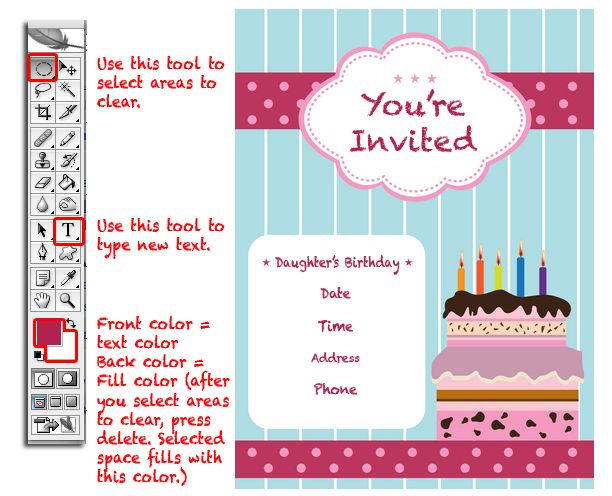


 • Job One ~ Create a banner for a website.
 It was a little trickier understanding what this client needed. He directed me to two “iffy” websites. One site had multiple pop-up windows, and the other was a blank template. He finally sent me a jpg of what he wanted, which I easily recreated. This is a good time to note that Fiverr is not responsible for any viruses you may download.